

Description
Download The Mathist – Math Tool for Students, Teachers, and Educators
Overview
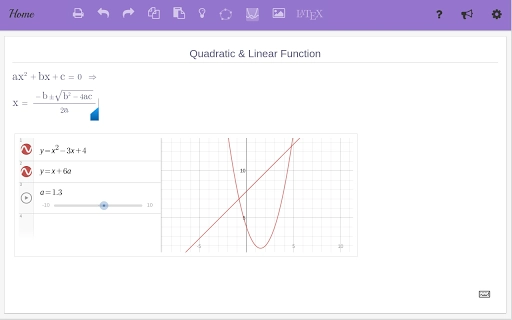
The Mathist is a desktop software application designed to simplify the creation and sharing of math-rich documents. It enables students, educators, and academic users to seamlessly combine text, images, and mathematical expressions within a single document without the need to learn complex syntax such as LaTeX. This makes it particularly useful for students exploring mathematical topics at home, practicing problems, and submitting assignments through shared links or integration with platforms like Google Drive. The tool is ideal for high school, college, and university-level learners who require a user-friendly interface for documenting their work. It also supports teachers and professors in monitoring student activity, identifying learning gaps, and detecting potential academic dishonesty through usage analytics. The application is accessible via a web-based beta version at www.themathist.com/beta, offering a modern, browser-based workflow. The developer did not provide additional background information beyond the product’s functionality and release timeline.
Key Features & Capabilities
- Integrated Math Expression Input – Users can insert mathematical equations and symbols directly into documents without requiring knowledge of LaTeX or other markup languages. This simplifies the documentation of problem-solving steps and theoretical explanations.
- Multi-Element Document Creation – The software allows combining text, images, and mathematical content in a single, cohesive document, ideal for study notes, homework submissions, and classroom materials.
- Google Drive Integration – Students and educators can share notes with peers, classmates, or instructors through direct sharing links, streamlining collaboration and assignment submission processes.
- Compute Feature Analytics – Teachers can monitor how students use the compute functionality, identify areas where additional support is needed, and detect suspicious usage patterns that may indicate academic misconduct.
- Browser-Based Printing & PDF Export – Notes can be printed directly using the browser’s print function (Ctrl/Cmd + P), and exported to PDF by selecting a virtual PDF printer, ensuring compatibility with academic submission systems.
- Support for Geogebra, Desmos, and LaTeX – The Mathist integrates with popular math tools, allowing users to embed interactive graphs, dynamic geometry, and advanced mathematical notation within their documents.
User Interface, Workflow & Performance
The user interface of The Mathist is designed with simplicity and efficiency in mind, offering a clean workspace that prioritizes document creation and editing. Navigation is intuitive, allowing users to switch between text input, image insertion, and math expression tools with minimal effort. The workflow supports real-time editing, enabling students to draft notes, insert visual aids, and add equations without switching between multiple applications. The developer did not specify resource usage details, so exact performance behavior in terms of CPU or RAM consumption remains unknown. However, based on general software behavior patterns, the application is expected to operate smoothly on modern Windows and Mac systems. Stability is assumed to be consistent, given the tool’s focus on core functionality and the absence of reported issues in public beta access. The browser-based nature of the beta version suggests low overhead during operation, though full desktop performance may vary depending on system configuration.
Compatibility & System Requirements
The Mathist is compatible with both Windows and Mac operating systems, making it accessible to a broad range of users across academic environments. The software has a file size of 100 MB, indicating a lightweight installation footprint. The application version is 1.0, released on February 15, 2024. Exact system requirements were not listed, including details about minimum processor speed, RAM, or disk space. Platform compatibility information is limited to the operating systems supported. The developer did not provide additional technical specifications, so users should ensure their system meets general desktop application standards. For optimal performance, it is recommended to use the latest version of the operating system and web browser if accessing the beta version.
Pros and Cons
Pros
- Intuitive interface that requires no LaTeX knowledge
- Supports integration with Google Drive for easy sharing
- Enables seamless combination of text, images, and math
- Offers analytics for educators to monitor student progress
- Includes browser printing and PDF export functionality
- Supports Geogebra, Desmos, and LaTeX for enhanced math capabilities
Cons
- Exact system requirements were not specified
- Resource usage details not provided
- Only available through a beta web version at this time
- Limited information on offline functionality
- No details on update frequency or release schedule
FAQ Section
Is The Mathist available for Windows and Mac?
Yes, The Mathist is compatible with both Windows and Mac operating systems.
Can I use The Mathist without an internet connection?
While the beta version is web-based and requires an internet connection, the developer did not specify whether a fully offline desktop version will be available in the future.
Is The Mathist safe to download and use?
The Mathist is designed for educational use and is accessible via a secure web interface. Users should ensure they are accessing the official site at www.themathist.com/beta to avoid potential security risks.
How often is The Mathist updated?
The developer has not provided information on the update frequency or release schedule for future versions.
What license type does The Mathist use?
The Mathist is currently offered as a free tool. No licensing details were provided beyond its availability at no cost.
Final Thoughts + CTA
The Mathist presents a compelling solution for students and educators seeking a streamlined way to create, share, and analyze math-based documents. Its ability to combine text, images, and mathematical expressions without requiring technical knowledge sets it apart from traditional tools. The integration of analytics for educators adds a valuable layer of insight into student engagement and learning patterns. While some technical details remain unspecified, the application’s core functionality is well-aligned with modern educational needs. For students practicing math at home and teachers managing classroom workflows, The Mathist offers a practical, accessible tool. Download The Mathist now to enhance your learning and teaching experience.
Guides & Tutorials for The Mathist App for Chrome
How to install The Mathist App for Chrome
- Click the Preview / Download button above.
- Once redirected, accept the terms and click Install.
- Wait for the The Mathist App for Chrome download to finish on your device.
How to use The Mathist App for Chrome
This software is primarily used for its core features described above. Open the app after installation to explore its capabilities.
User Reviews for The Mathist App for Chrome 0
No reviews found





